

New GivePanel Feature: 1-Click JustGiving Experience for Facebook Challenges
It’s time to wave bye-bye to juggling multiple forms during your social fundraising campaigns and say hello to GivePanel’s latest feature release, the 1-Click JustGiving Experience for Facebook Challenges.
We’ve teamed up with the good folks at JustGiving, the biggest fundraising platform in the UK, to bring nonprofits the flexibility and tools you need to provide supporters with a seamless supporter journey.
Want to find out how this latest feature release could transform your social fundraising efforts? We thought you might…
New features now available!
It’s 2024 and we’re super excited to announce that our JustGiving integration now has five new features available to all GivePanel customers. But why the buzz?
These updates aren’t just about bells and whistles; they’re designed to address real challenges your nonprofit is facing. We know that fundraisers who claim their pages on JustGiving raise more so these updates are specifically designed to improve the percentage of fundraisers doing just that.
From targeted communication to visualizing options and tracking fundraiser status, we’ve got you covered. So without further ado, here’s a breakdown of what’s new with our JustGiving integration:
1. Direct emails to JustGiving fundraisers
Aka, targeted communications made easy. Our first new feature allows you to connect directly with fundraisers, whether they’ve claimed their JustGiving pages or not.
If you have the JustGiving email feature enabled in your account, reach out to supporters who’ve registered and created a JustGiving fundraiser via the integration and support them with personalised comms delivered straight to their inbox. Segment your emails based on page status and even include [UnclaimedPageURL / ] to generate claim links for those who haven’t yet claimed their page.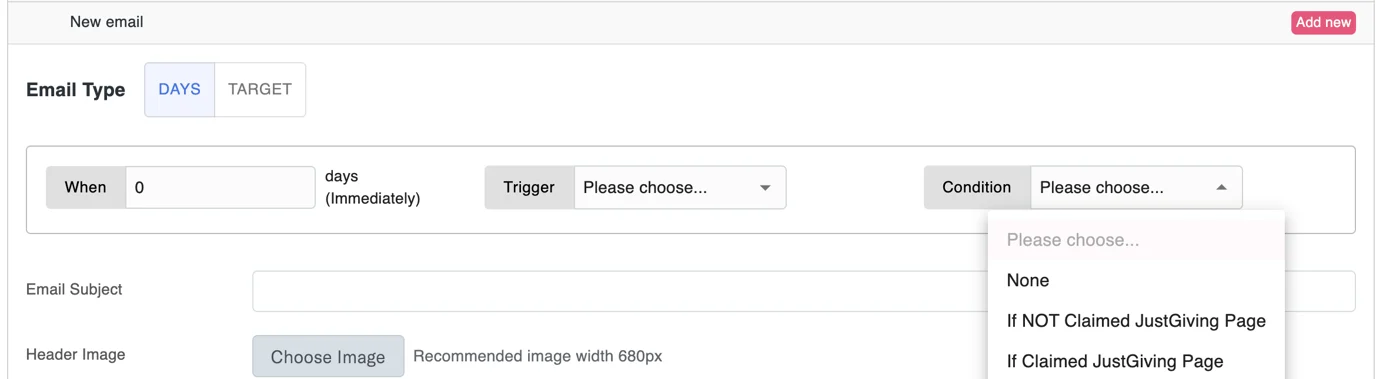
Check out our handy help article on how this works and how to access our JustGiving email Beta feature to get started.
2. Enhanced form preview panel
Ready to see your JustGiving registration form come to life? Our enhanced form preview panel allows you to see your JustGiving options before publishing your form, making the creation process a breeze and cutting out the guesswork!
3. Filter claimed/ unclaimed fundraisers
We ain’t about that “ballpark figure” lifestyle, so now, we’re giving you the ability to filter fundraisers based on their page status so you can get a clear picture of your Challenge performance.
While “Unclaimed” means the supporter created a fundraiser but hasn’t claimed it yet, “Claimed” indicates they’ve completed the JustGiving journey. Keep an eye on your supporters’ JustGiving pages and send claim links using our email triggers. 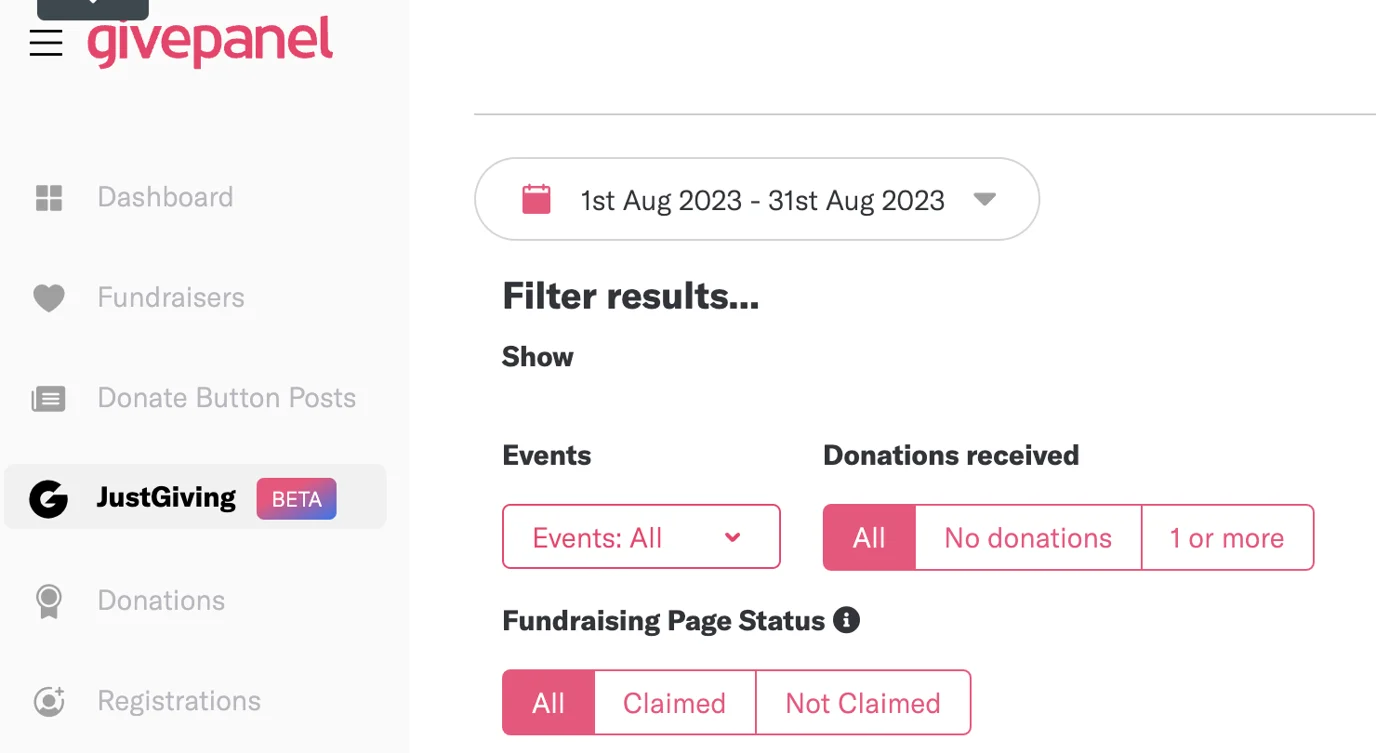
Get the full lowdown on how this feature can support your fundraising via our help article.
4. JustGiving fields in Report Builder
This one doesn’t need much explanation but boy, will it pack a punch with your fundraising analysis. Gain deeper insights with new fields in the Report Builder, including Unclaimed URL, Page Name, Fundraiser URL, and Source. Boom.
5. Create Fundraisers for JustGiving campaigns
Need a feature to boost engagement and participation? Here’s one: you can now link JustGiving fundraisers created through GivePanel’s 1-Click tool to a JustGiving campaign, meaning you have the ability to customize the fundraisers through the campaign setup process in JustGiving.
In other words, pull your campaign details from JustGiving through to GivePanel and create fundraisers that match, streamlining the supporter experience and saving you a whole lotta’ time.
Find out what steps you need to take to make this happen for your next Facebook Challenge.
6. Import all JustGiving data
Err, did we just save the best till last? Yes, yes we did.
With our final feature update, it’s time to see the bigger picture. Charities now have the power to import JustGiving data for ALL their event fundraisers, providing a fuller picture of their fundraising success in GivePanel. Simply authorize GivePanel’s access, set up the JustGiving App and integrate this with GivePanel, and watch as your insights expand, giving you a comprehensive view of your fundraising impact.
Our JustGiving data import feature is currently in testing mode. To apply for access, please fill out this form and our team will be in touch when it’s ready to launch.
Can’t wait to get started?
If you’re feeling more excited than a kid at Disney World (wouldn’t blame you) and ready to kickstart your 2024 social fundraising complete with our JustGiving integration, visit our dedicated JustGiving integration help article center to get our step-by-step guides to the latest feature releases. Alternatively, keep scrolling and learn more about GivePanel’s 1-Click JustGiving Experience for Facebook Challenges.
Not at one with our JustGiving integration yet? Email [email protected] and request to have the integration set up in your account and our Support team will help you faster than you can say lickety-split.
The key benefits
Before we get into the nitty gritty details, I want to hit you with the top four reasons why we think this feature could be a game changer for social fundraising campaigns.
- Improve supporter experience – we spoke to your supporters to find out what their pain points are when taking part in a Facebook Challenge and that research shaped this latest feature.
- Increase fundraiser activations – by improving the supporter experience, we believe this feature will naturally lead to a higher fundraiser conversion rate.
- Monitor performance in GivePanel – see how much money has been raised via Facebook and via JustGiving, all in the one place.
- Innovate by testing Instagram, TikTok or LinkedIn – your nonprofit can use this feature to develop fundraising campaigns on other social media platforms and stay at the forefront of a fast-moving sector.
Learning from charities, fundraisers and donors
At GivePanel, we talk to the people who support you and we design for them. But what does this mean in reality?
As part of our ongoing research and development for improving the Facebook fundraising return on investment for nonprofits and building new features to drive value for our charities partners around the world, we gathered in-depth insights from our customers, their fundraisers and their donors.
So, what did we learn?
- 70-80% of supporters using GivePanel’s custom (1-Click) registration form with fundraiser activation are happy to submit and activate a Facebook fundraiser.
- However, a significant percentage of those supporters object to using Facebook as a fundraising platform for a variety of reasons, including privacy and policy restrictions.
- These supporters need a different, non-Facebook option that is entirely separate from the social media platform.
And it wasn’t just supporters that were flagging this as a potential area for development. GivePanel customers were also actively highlighting JustGiving as an alternative option for supporters when advertising their Facebook Challenges. Many nonprofits were creating two GivePanel forms for every one Facebook Challenge which not only caused problems with data matching and exporting, it also led to confusion with supporters being linked to different forms with differing touch points. If that wasn’t headache-inducing enough, supporters were also having to manually create an account before creating a fundraiser, which was leading to what every nonprofit fears – significant drop-off in fundraiser creation.
Having listened to supporters and charities, it was clear that we needed to provide nonprofits the flexibility and tools to be able to offer an off-Facebook fundraising route for Facebook Challenges. And that’s where our partnership with JustGiving comes in.
Why JustGiving?
If you didn’t already know, JustGiving happens to be the largest fundraising platform in the UK. They have the best APIs in the biz’ which means they can offer super slick Strava integrations, real time donations and brilliant data exports, as well as high customer satisfaction ratings with 95% of their customers recommending them. Understandably too, is the fact that many charities already have processes in place for JustGiving and don’t want to add another data source to the mix.
Jamie Parkins – Senior Manager, Product Management at JustGiving
We knew what our customers wanted, we knew what their supporters wanted, and we knew which fundraising platform we had to work with. Luckily, the folks at JustGiving were just as excited about a potential partnership as us!
Social media platforms are an important acquisition channel for charities and non-profits; however, our research shows they aren’t always a consumer’s first choice for online fundraising. We’re proud to be innovating with the GivePanel team on a JustGiving integration that will enable charities to seamlessly connect their Facebook Challenges with the UK’s most trusted online fundraising platform.
This powerful new fundraising tool will enable charities to offer their supporters a superior fundraising journey on a platform they know and love, whilst also enabling charities to be more efficient and use processes they already have set up with JustGiving.
1-Click JustGiving experience for Facebook Challenges
It’s what you’ve all been waiting for: GivePanel’s 1-Click JustGiving experience for Facebook Challenges has arrived.
And what’s that? GivePanel are offering not one, not two, but three JustGiving journeys for fundraisers? Let’s break these down into what each option means for your next Facebook Challenge.
Journey 1: Facebook 1st, JustGiving 2nd
We know that 70-80% of supporters will activate a fundraiser and submit a form first time, but a small percentage may choose to submit without activating a fundraiser straight away. We also recognize that one of their primary objections to activating a Facebook fundraiser is that Facebook will publish their page immediately upon activation.
With this first journey option, if the supporter chooses not to activate a Facebook fundraiser straight away, they are given the ability to activate a JustGiving fundraiser instead. This puts the supporter in control of sharing abilities and foregos the additional step of setting up a JustGiving account. 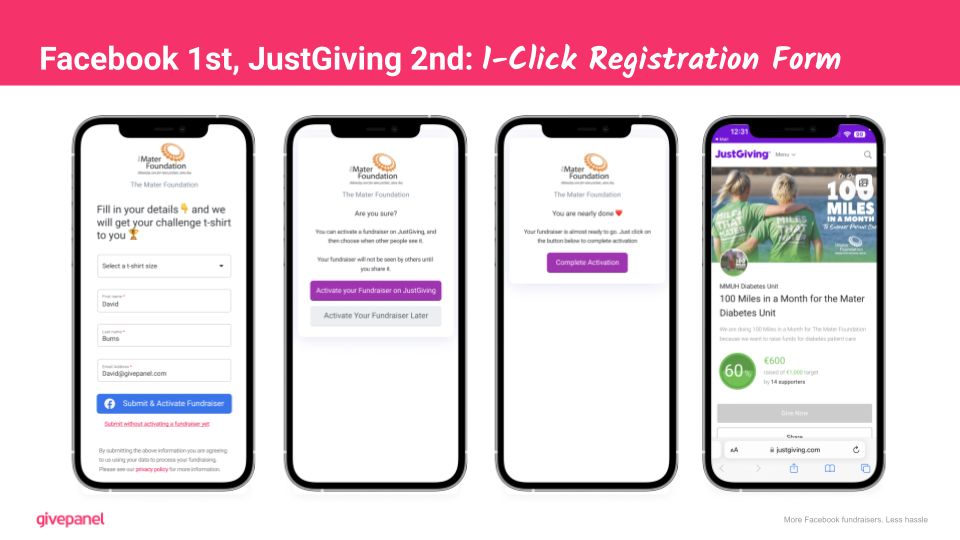
Journey 2: Multiple Submit Options
In this day and age, we’ve become accustomed to having options readily available at our fingertips. When it comes to using a new app, chances are you’ll have experienced being presented with various familiar options to login, such as Facebook or Google. Imagine having that same kind of flexibility when it comes to submitting and activating a fundraiser.
That’s where the Multiple Submit Option journey comes into play. With this functionality, the supporter will be given two options to submit and activate a fundraiser through Facebook or JustGiving. And if a supporter opts to submit without activating a fundraiser, they will encounter a screen that outlines the advantages of enabling a fundraiser through JustGiving. This journey tackles the primary pain point of when and how to promote the fundraiser to friends and family, making it easier for supporters to decide. 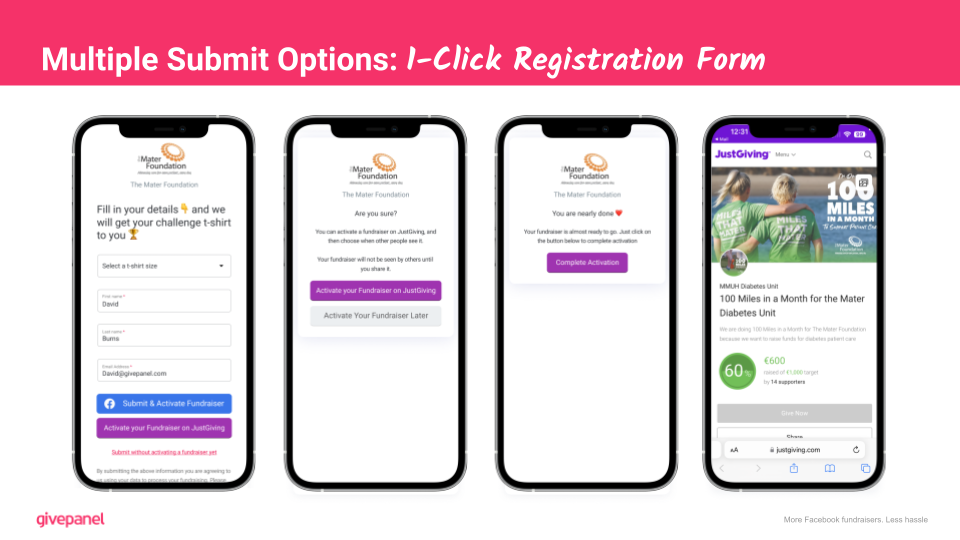
Journey 3: JustGiving Only Submit
And last but not least, our third journey option of JustGiving Only Submit could be a game-changer for fundraising on other social media platforms such as TikTok and Instagram and here’s why.
Firstly, the process is simple: supporters activate their fundraiser on JustGiving by hitting the submit button, which immediately populates the fundraiser URL and creates their page. If they choose to submit without activating their fundraiser yet, like the previous option, they’ll see a screen that explains the benefits of JustGiving, ensuring they’re encouraged to take action directly.
Secondly, supporters that engage with your nonprofit on other social media platforms are likely to have a stronger objection to using Facebook and therefore this option can provide a seamless experience for them to fundraise and take part in your campaign.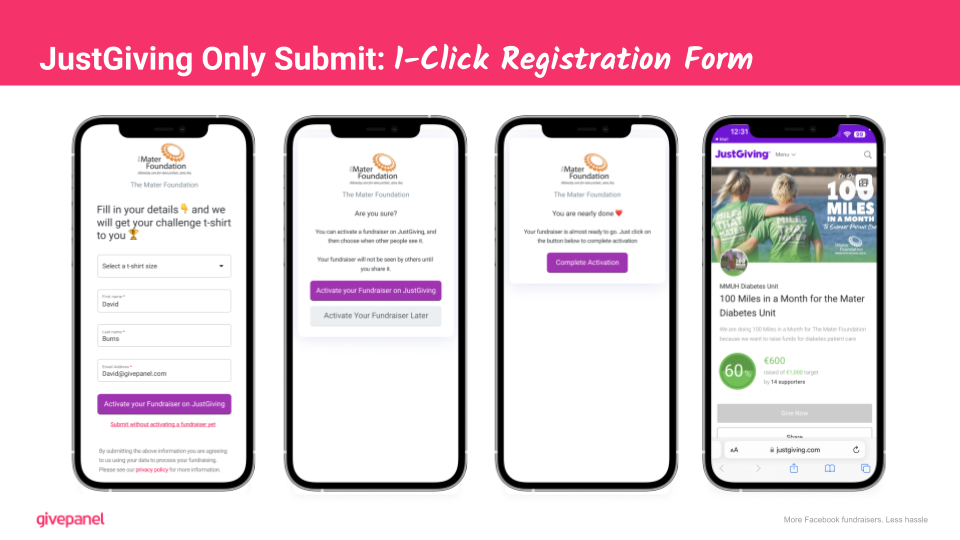
What other new capabilities are there in the GivePanel platform?
As well as the three journey options for supporters, the 1-Click JustGiving experience for Facebook Challenges also includes a host of new capabilities within the GivePanel platform.
- JustGiving feature flag – this allows your nonprofit to turn on and off specific features without changing any links in your campaign, allowing you to easily tailor your fundraising efforts to specific events.
- Separate JustGiving tab – your JustGiving fundraisers will be separated from Facebook fundraisers so you can see at a glance how each platform is performing.
- JustGiving registrations – 100% of JustGiving registrants will be matched immediately to their contact details, helping to simplify the process of sending incentives out. You’ll be able to view all JustGiving registrations alongside your Facebook registrations within GivePanel.
- Email and SMS stewardship – your nonprofit can use GivePanel’s email and SMS tools in your stewardship journeys for JustGiving fundraisers, allowing you to streamline your communications with supporters and maximize fundraising efforts.
What do I need?
We know that you’re itching to remove those training wheels and race ahead to your next Facebook Challenge but before you do, there are a few requirements you’ll need in order to get started.
First up, you’ll need a JustGiving charity account, and you’ll need to build your event within JustGiving. From there, you’ll need your JustGiving charity ID and JustGiving event ID for the specific event you’re running.
Now, let’s talk GivePanel. You’ll need a GivePanel account and you’ll need to be onboarded with Facebook’s Giving Tools. When that’s done, you’ll need to build your GivePanel Facebook Challenge and match it as closely as possible to that of your JustGiving event in terms of titles, descriptions and start and end dates.
Once you’ve got your JustGiving event and GivePanel Facebook Challenge set up, you’ll be able to link the two via our integration and freewheel into fundraising success.
For more detailed instructions, check out this help article in our Knowledge Base.
Next steps
Here are our top recommendations for what your nonprofit can do next:
- Review your upcoming fundraising events plan – is there an opportunity to test this feature for an upcoming Facebook Challenge?
- Think outside the box – we love hearing how our nonprofit customers innovate. Why not try Instagram or LinkedIn as a test with this new feature?
- Fill out the application form for Beta access – Beta means earliest possible access while it’s being built. After Beta, it will become a standard feature for all GivePanel customers.
- Let us know what to focus on next – what’s the next GivePanel feature you’re itching to get your hands on? Give us your ideas and we’ll build them!
Book a demo
If you aren’t yet a GivePanel customer, book a demo with one of our fundraising specialists who will be happy to give you a tour of the platform and let you in on the secrets to Facebook fundraising success.