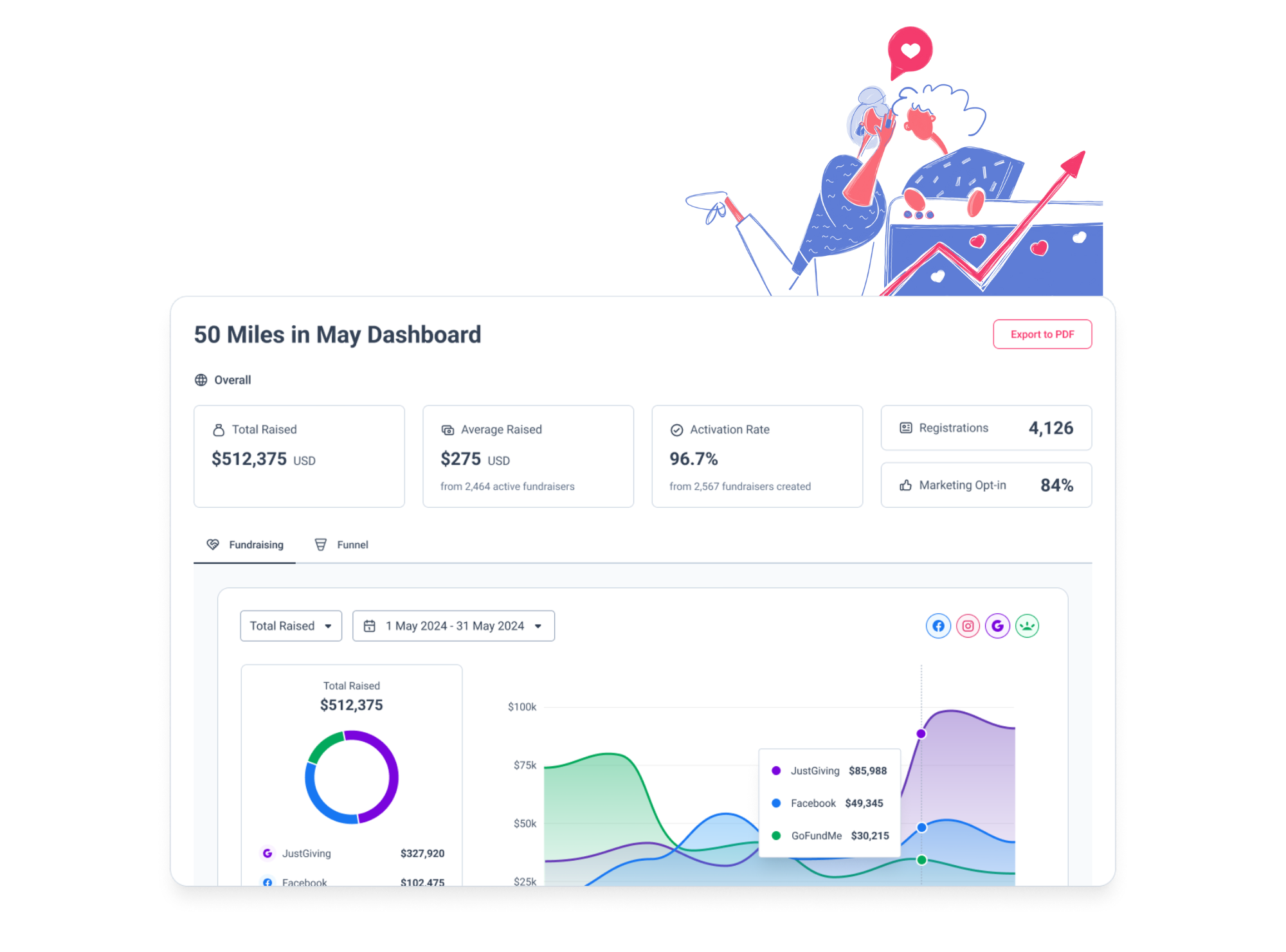
Access comprehensive fundraising insights across all platforms and campaigns in one centralised location. Our reporting tools turn complex data into actionable intelligence that drives better fundraising results.
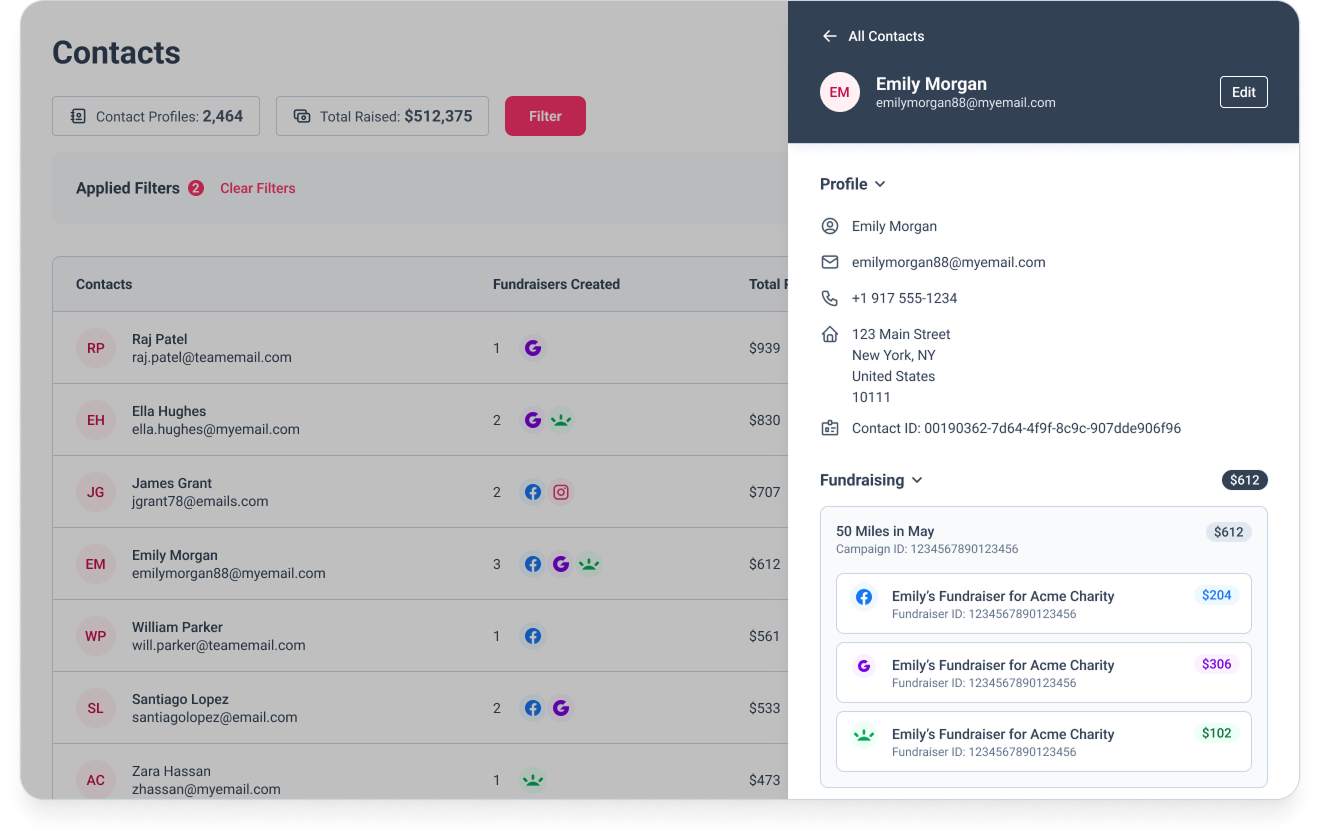
View complete supporter history in individual profiles showing all interactions, registrations, and fundraising activity across your entire program.
Connect GivePanel with your existing technology stack through our flexible APIs and purpose-built integrations for a seamless fundraising ecosystem.
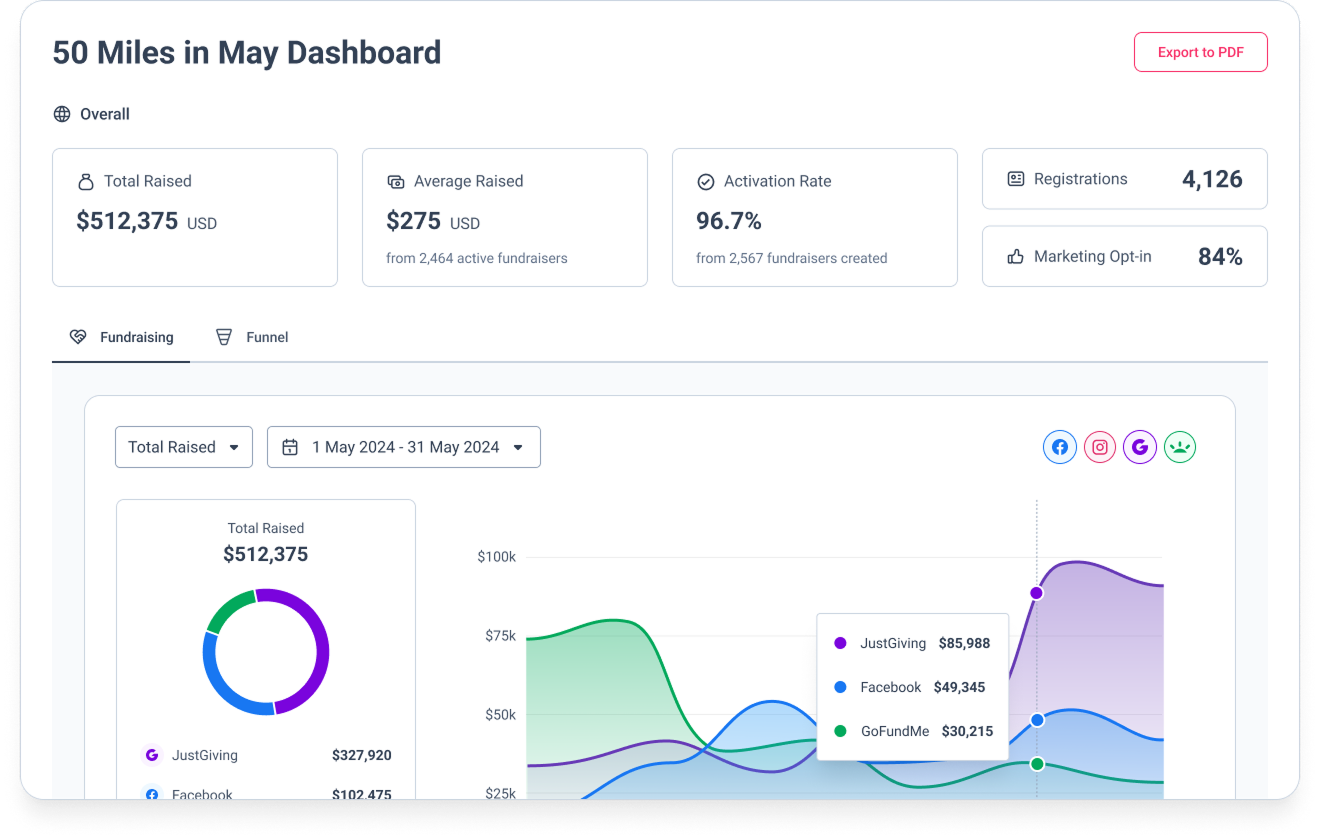
Monitor campaign performance in real-time with comprehensive dashboards that highlight key metrics and conversion points across your fundraising efforts.
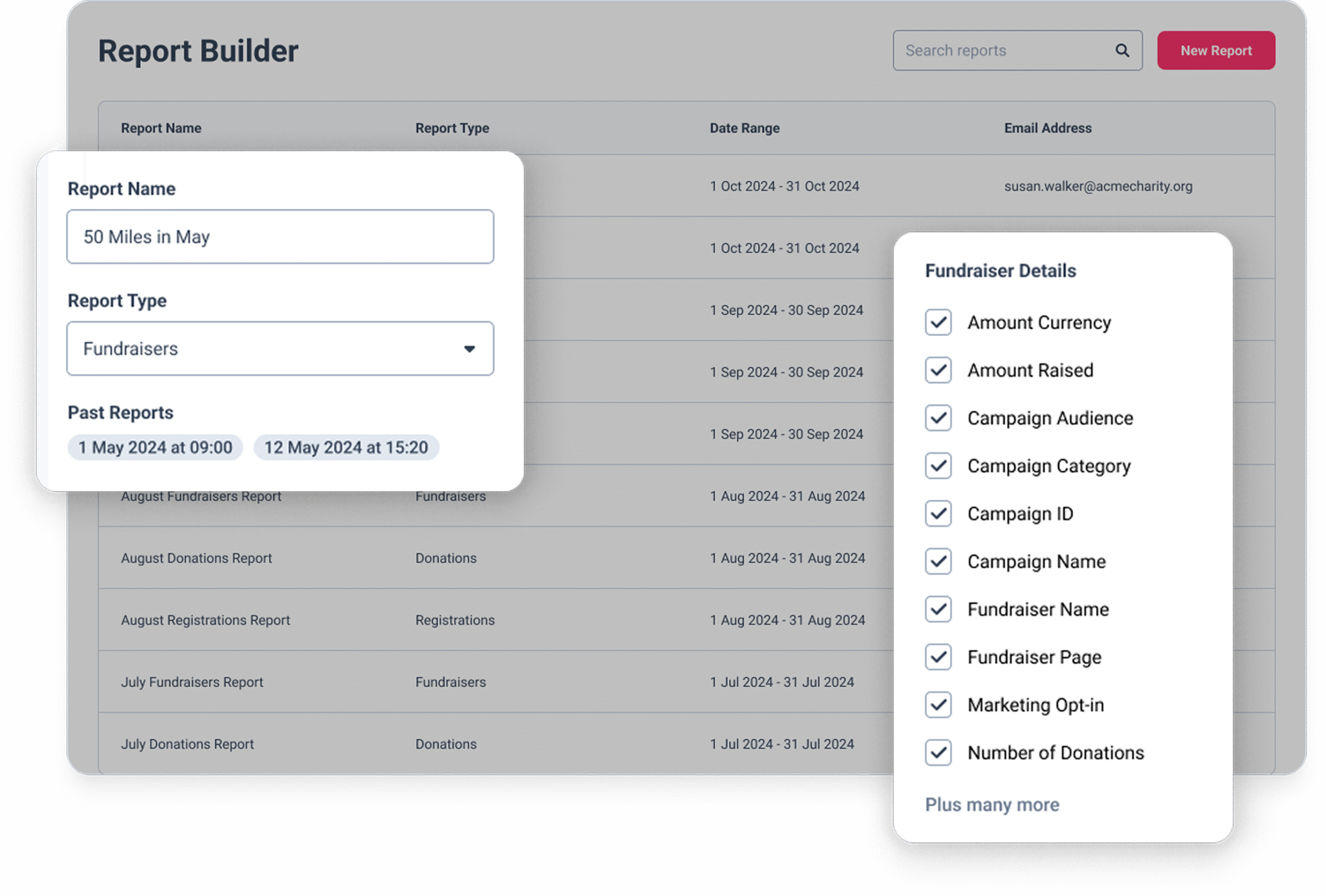
Create custom reports tailored to your specific needs, selecting exactly which data points to include for specialised analysis and decision-making.
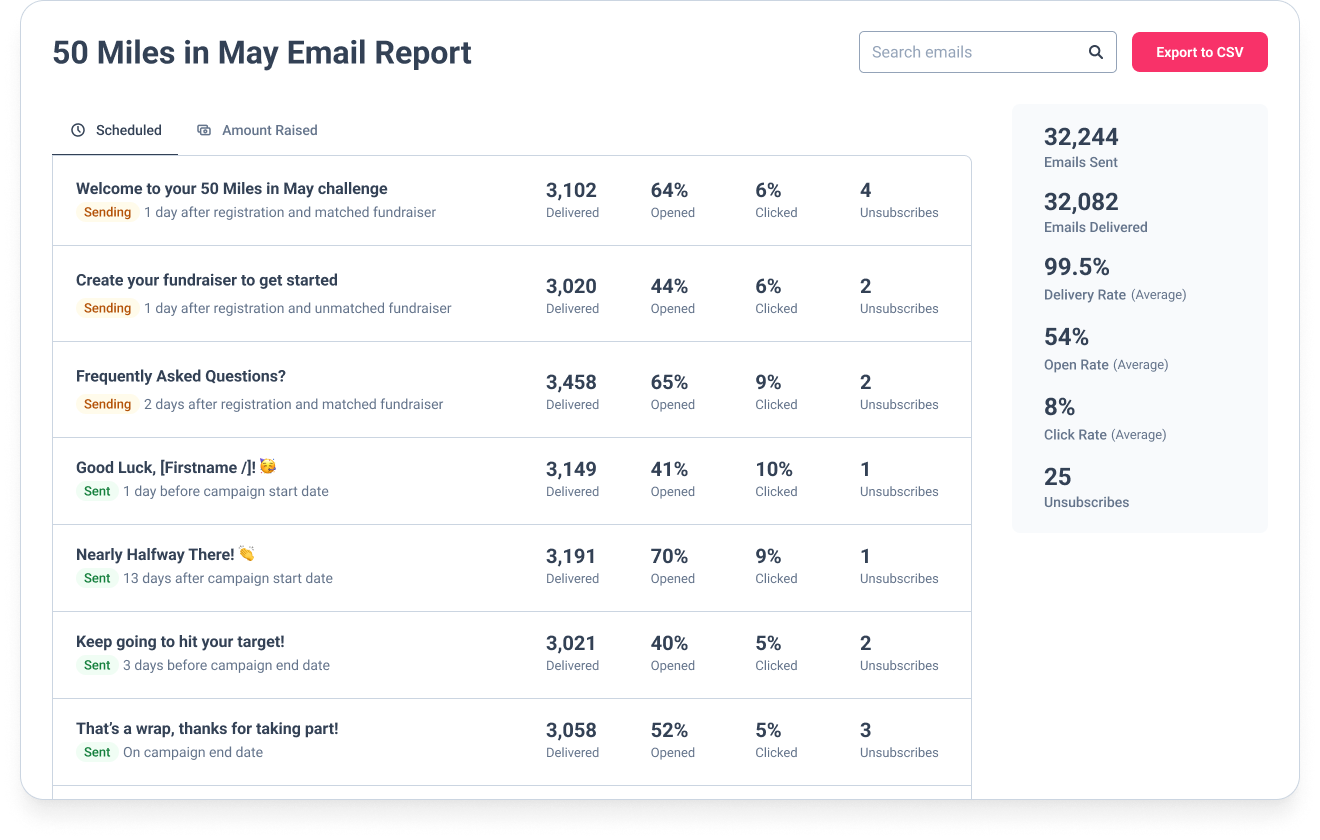
Track the effectiveness of your email communications with detailed performance metrics that help optimise messaging and improve engagement.
How do charities track fundraising performance across multiple platforms?
When your fundraisers are spread across JustGiving, Facebook, and GoFundMe, getting a single view of campaign performance usually means exporting separate reports from each platform and reconciling them manually – which is time-consuming and prone to gaps. A peer-to-peer fundraising platform that imports data from all your platforms automatically solves this: everything lands in one place, you can see total raised, active fundraisers, and donation data across all platforms in a single dashboard, and reporting doesn’t require stitching anything together by hand.
What’s the best way to report on peer-to-peer fundraising campaigns?
The most useful P2P fundraising reports focus on three things: conversion (what percentage of registrants became Active Fundraisers), average raised per Active Fundraiser, and total income by platform or segment. Beyond top-line totals, the ability to filter and segment – by date range, event type, fundraising platform, or supporter characteristics – is what turns data into decisions. For stakeholder reporting, clean CSV exports that connect registration, fundraising, and donation data in one place make it straightforward to build the view your leadership or finance team needs.
How can charities measure the return on investment of their fundraising advertising?
Measuring advertising ROI in charity fundraising can be tricky, because the outcome – money raised – happens on a separate platform to the ad click. To get a true picture, you need to connect your ad spend data to actual fundraising outcomes for the supporters those ads generated. GivePanel’s Lead Ad Performance report does this for Meta lead ads: it matches lead form submissions to fundraising activity in GivePanel, giving you cost per lead, cost per Active Fundraiser, and return on ad spend broken down by ad set and creative – so you can see which ads are driving fundraising income, not just form fills.
What data can I see in a supporter’s contact profile?
Every supporter in GivePanel has a unified contact profile that brings together their full history in one place: registration data, fundraising activity across all platforms, donation totals, matched fundraiser pages, marketing consent status, and any labels or codes your team has added. You can view and edit individual profiles directly, and the data updates as their activity progresses across your campaigns.
How does the campaign dashboard work?
The campaign dashboard gives you a top-line view of how each campaign is performing. Key metrics include total amount raised, average raised per Active Fundraiser, activation rate (the percentage of fundraisers who have received at least one donation), number of registrations, and marketing opt-in percentage. For DIY campaigns, the dashboard also lets you segment data by event type – for example, runs, bake sales, or weddings – so you can see which types of supporter-led fundraising are performing best.
What reports can I build in GivePanel?
GivePanel’s Report Builder lets you create custom exports across three report types: fundraiser reports, donation reports, and registration reports. For each report you can choose your date range and select exactly which data columns to include. Reports are generated asynchronously – once you click ‘Save and Export’, GivePanel emails you when the report is ready to download. This approach supports large date ranges and exports of more than 50,000 rows without timing out.
What format are GivePanel exports in?
Reports are downloaded as CSV files, which can be opened in Excel, Google Sheets, or imported directly into your CRM or data warehouse. If you’re using Excel and your data includes Facebook campaign IDs, the help centre has guidance on preventing Excel from reformatting those ID numbers incorrectly.
Can I share campaign performance with stakeholders?
Your team can view campaign dashboards directly in GivePanel. For sharing externally – with senior leadership or board members who don’t have GivePanel access – the most reliable approach is to export your data via Report Builder as a CSV and present it in your preferred format. Speak to the GivePanel support team if you have specific stakeholder reporting requirements.
How does email reporting work?
GivePanel tracks open rates and click rates for every email sent through your journeys. Each email’s performance is automatically compared against the average for your account – emails that perform 30% better than your account average are labelled ‘Above Average’, while those performing 30% below are labelled ‘Below Average’. This makes it straightforward to spot which messages are landing well and which journeys may need adjusting. You can also export all email reporting data to CSV for deeper analysis.
What is the Lead Ad Performance report?
The Lead Ad Performance report connects your Meta lead ad data to real fundraising outcomes in GivePanel. Once enabled, it shows you metrics including ROAS (return on ad spend), cost per lead, cost per Active Fundraiser, and total fundraisers raised – broken down by ad set and ad creative. This lets you identify which ads are driving the best fundraising return, not just the most form submissions. The report needs to be enabled by the GivePanel support team before it appears in your account. Note that not all leads can be matched to fundraisers, so treat it as a directional guide rather than a complete picture.
What integrations does GivePanel support?
GivePanel integrates natively with JustGiving, GoFundMe, Facebook, iDonate, and PayPal Giving Fund on the fundraising side. Beyond that, GivePanel offers API access and a Zapier integration for connecting your account to CRMs, email platforms, SMS tools, and other systems in your tech stack. The integrations section of the help centre has setup guides for each. If you have a specific integration requirement that isn’t listed, contact the support team.
Can I see fundraising data from JustGiving directly in GivePanel?
Yes. GivePanel has a deep native integration with JustGiving which imports fundraiser and donation data daily. Once the integration is active, your JustGiving campaign activity flows into GivePanel automatically, and you can view, filter, and report on it alongside data from other platforms. There is also a help centre article on how GivePanel and JustGiving interact if you already have a direct JustGiving-to-CRM integration in place.
Let’s optimize your performance.